

Download Geany – text editor, code editor, programming tool, developer tool, software development, code writing, code management, code formatting, syntax highlighting, code completion, code snippets, code templates, IDE alternative
Overview
Geany is a lightweight yet powerful text editing tool designed to support efficient programming across multiple languages. Built with the GTK2 toolkit, it delivers a streamlined environment for developers who need a fast, reliable solution for writing, editing, and managing code. The app serves as a practical alternative to full-featured IDEs, offering essential tools without the overhead of resource-heavy applications. It is particularly suited for programmers working on small to medium-sized projects, students learning to code, and developers who prefer minimalism and speed in their workflow.
Geany addresses common challenges in code development, such as syntax errors, disorganized code structure, and inefficient file management. Its built-in syntax correction helps users detect and resolve issues early in the development process, reducing debugging time. The app supports a broad spectrum of programming languages, including C, Java, PHP, HTML, Python, Perl, and Pascal, making it a versatile choice for cross-language development. Real-world use cases include writing scripts, developing web pages, debugging small applications, and teaching programming fundamentals. In the broader app ecosystem, Geany fills a niche for developers seeking a lightweight, open-source tool that balances functionality and performance.
Key Features & Functionality
- Syntax Correction: Geany automatically identifies syntax errors in real time, highlighting problematic lines and offering suggestions for correction. This feature is especially valuable for beginners learning syntax rules and for experienced developers working under time constraints.
- Code Folding: Users can collapse or expand sections of code, such as functions or loops, to improve readability and focus on specific areas. This is ideal when navigating large files or complex codebases.
- Autoclosing HTML Tags: When editing HTML, Geany automatically inserts closing tags after opening ones, preventing common markup errors and ensuring clean, valid code.
- Multi-Language Support: The app provides syntax highlighting, code folding, and intelligent indentation for a wide range of languages, enabling consistent coding standards across different project types.
- Simultaneous File Editing: Geany allows users to open and switch between multiple files using tabs, enabling efficient multitasking and easy reference between related files.
For example, a web developer can use Geany to write HTML, CSS, and JavaScript in separate tabs while relying on autoclosing tags and syntax highlighting to maintain clean code. A student learning Python can benefit from real-time error detection and code folding to better understand program structure.
Interface, UX & Performance
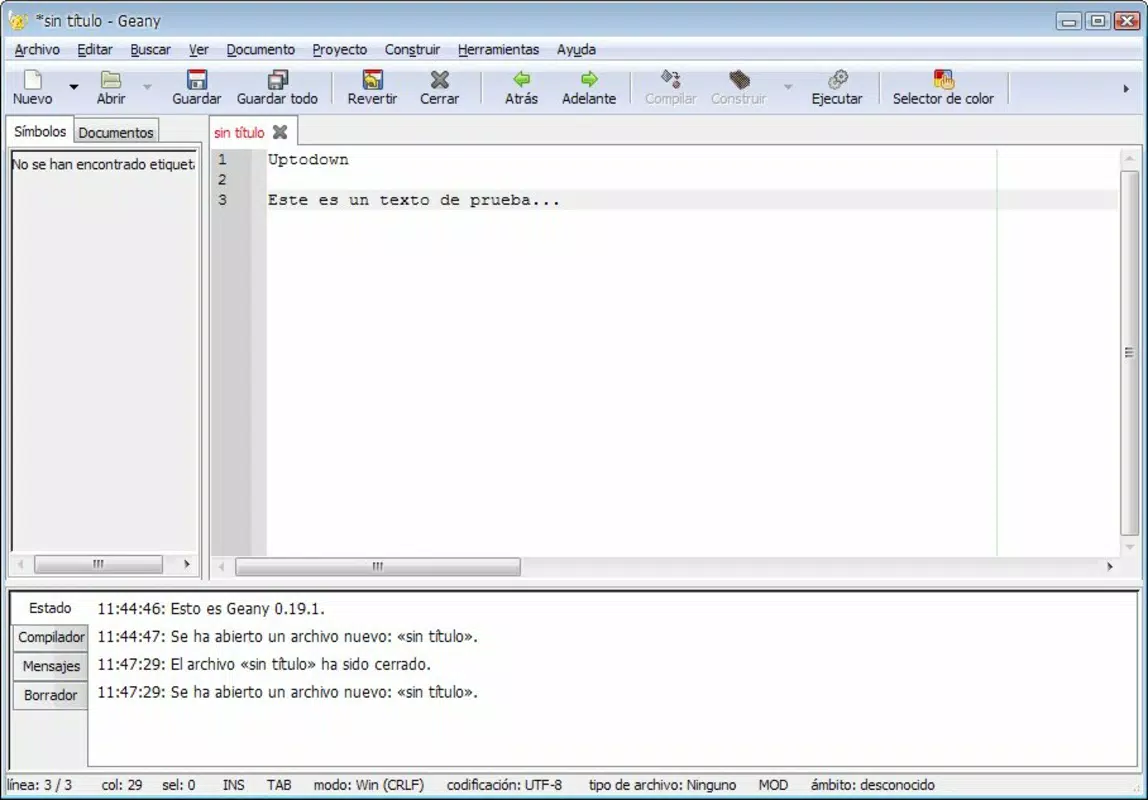
Geany features a clean, minimal interface that prioritizes functionality over visual flair. The layout is divided into a main editing area, a side panel for file navigation, and a status bar at the bottom. Navigation is intuitive, with keyboard shortcuts and context menus supporting rapid workflows. The app uses a tab-based system for managing multiple files, allowing users to switch between them with ease.
Visual design is straightforward, with customizable themes and color schemes to suit user preferences. Although the developer did not list formal performance metrics, the app is known for its low memory footprint and fast startup times, which is consistent with its lightweight architecture. It performs efficiently on older hardware and runs smoothly on various device categories, including laptops and desktops.
Responsiveness is maintained even when handling large files or multiple open documents. Stability is generally high, with minimal crashes reported in the community. The app remains responsive during code compilation and syntax checking, ensuring a consistent user experience.
Platform Compatibility & Technical Requirements
Geany is available on Windows, Linux, and macOS, making it accessible to a wide range of users regardless of operating system. The current version is 1.43, with a file size of 12.7 MB, indicating a compact and efficient installation. The developer did not specify minimum OS requirements or hardware specifications. Compatibility information was not fully disclosed, but the app’s lightweight nature suggests it can run on systems with modest resources. Users should ensure their system meets the standard requirements for running desktop applications on their respective platforms.
Pros and Cons
Pros
- Lightweight and fast, ideal for older or low-spec devices
- Supports a wide range of programming languages with syntax highlighting
- Real-time syntax correction enhances code quality
- Code folding improves readability and navigation
- Free to download and use, with no in-app purchases
Cons
- No built-in version control integration
- Limited debugging tools compared to full IDEs
- Customization options are basic compared to advanced editors
- Developer did not provide detailed system requirements
- Not available as a mobile app; designed for desktop use only
FAQ
Is Geany safe to download and install?
Yes, Geany is a free, open-source tool developed by a trusted community. It does not contain malware or ads, and it is widely used by developers worldwide.
Can I use Geany on mobile devices?
Geany is designed for desktop operating systems only. It is not available for Android or iOS devices.
Does Geany support code completion?
Geany offers basic code completion features, particularly for syntax elements like HTML tags and common language constructs. However, it does not include advanced AI-powered completion.
How often is Geany updated?
The app receives regular updates, with the latest version released on May 10, 2024. The developer maintains the project actively, addressing bugs and adding minor improvements.
Is Geany suitable for beginners?
Yes, Geany is beginner-friendly due to its simple interface, real-time error detection, and support for multiple languages. It is commonly used in educational settings to teach programming fundamentals.
Final Thoughts
Geany stands out as a reliable, efficient, and free tool for developers seeking a lightweight alternative to full-featured IDEs. Its combination of syntax correction, code folding, multi-file editing, and broad language support makes it a strong choice for both learning and professional use. While it lacks advanced features like integrated debugging or version control, its simplicity and performance make it ideal for users who value speed and minimalism. Whether you're a student, freelance developer, or hobbyist, Geany delivers consistent value without the bloat.
Download Geany now


